

Pro capability
AI that respects your geometry, not just your pixels
Renderz uses your floor plan, model view or reference image to guide the rendering. Describe the materials, lighting and atmosphere you want to explore. AI-generated results can differ from the source. Check the layout, openings and proportions before presenting the result.
30 trial credits. No credit card required.
From geometry to material
A clearer conversation about the facade.
A volume study explains the building. Materials and daylight help your client picture it. Keep both views together when you review the proposal.
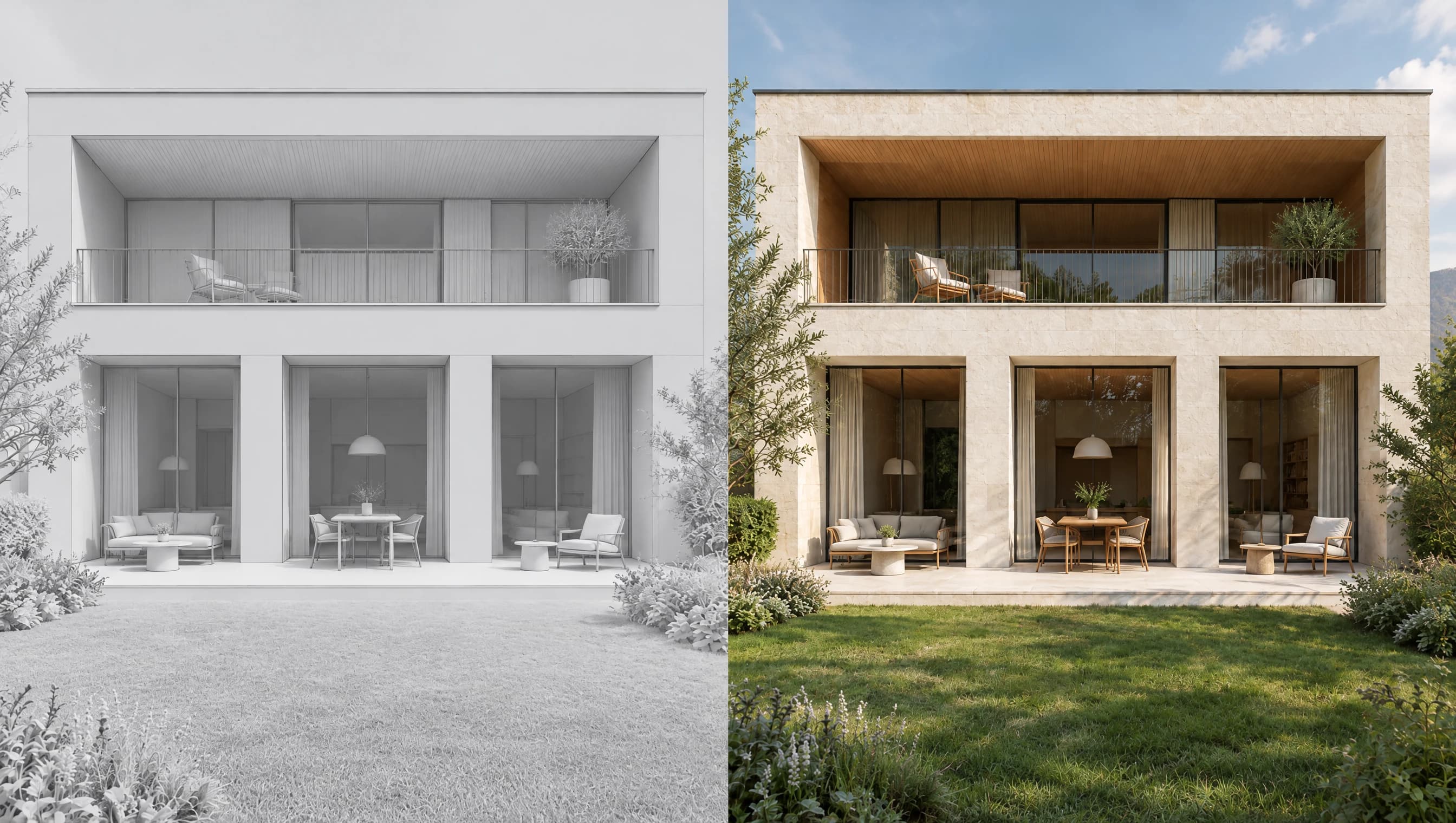
Drag to compare. Use the arrow keys when the slider is focused.
What to check, before the client sees it.
- 01
Openings
Count the window bays and compare their spacing. A convincing material finish does not guarantee an unchanged opening.
- 02
Depth
Check the balcony recess, roof edge and terrace against your drawing. Keep the model as the technical reference.
- 03
Materials
Review the stone scale, timber direction and light separately. Change one part of the brief for each option.
A brief to adapt
Use my uploaded perspective as the reference. Explore pale limestone, oak soffits and warm afternoon light. Keep the three ground-floor openings, recessed balcony and roofline. Do not add windows or extend the building.
Suggested instructions for your own source image. Results vary with the source and generation settings.
30 trial credits. No credit card required.
Knows plans from perspectives
Start from a floor plan or model view, then describe the materials and atmosphere you want to explore. The source provides a reference for viewpoint and composition.
Review the layout
Compare walls, openings and proportions with the source to identify differences before discussing materials.
Trustworthy for client work
Bring material and lighting options into design reviews, with the source plan or model alongside each image.
Frequently asked questions
- Will the AI change my floor plan?
- It can. AI-generated results can differ from the source. Renderz uses your source and instructions to guide the composition. Compare walls, openings and proportions before presenting the result.
- How is this different from generic AI image tools?
- Renderz uses your source image and instructions to guide the rendering. Compare the result with the original design to check whether the intended geometry has been followed.
- Does it work for both interiors and exteriors?
- Yes. Use interior views, facades or site photos as references, then check the generated geometry against the source.
Continue with an architect workflow
See how geometry-aware rendering fits the tools and reviews already in your practice.
Explore more
Try architecture-aware ai on your next project
30 trial credits, no credit card required. Test Full HD renders, 4K upgrades and animations.